


Over the past six months, hundreds of our large enterprise SaaS clients have upgraded to the d8n platform — and now they have everything they need to begin their own AI transformation. I talk a lot with the leaders of these companies, and the questions that come up most often are these: what does AI transformation look like in practice, where do you start, what can AI agents do and what can they not do. The AI agenda is on everyone’s lips now, but most people still have a lot of confusion about how generative AI differs from agentic AI, and how the capabilities of a simple chatbot differ from those of an AI agent.
I decided to write an article on my blog about practical approaches to AI transformation in companies — so you can study it on your own and come back to it when you’re ready to act. This is first of all for our clients who already run on d8n, but I think it will be useful to any leader with the same question.
First, why «where do you start» is the right question. Last summer MIT published a study: of hundreds of corporate AI pilots into which companies poured $30–40 billion, 95% produced no measurable impact on the bottom line. McKinsey adds: only 39% of companies see any impact of AI on their financial result at all. Gartner predicts that over 40% of agentic-AI projects will be canceled by the end of 2027 — due to cost, unclear value, and weak control. The majority fail — and in my experience, almost always for the same reasons.
The main one is a misconception about what AI actually is inside a company. In many people’s minds, «adopting AI» means a smart chatbot will appear that just knows everything — drafts the letters itself, figures out who to reply to and how, understands our internal order on its own. Here’s the thing: on its own — it doesn’t know. We’ve worked deeply with AI for a long time, and the takeaway is simple: for an agent to perform actions predictably, it needs three things. First — processes that are built out and fixed: an agent works inside a process, and if the process lives in people’s heads and email threads, the agent has nothing to work in. Second — a properly built knowledge base the agent answers and acts from. Third — the preparatory work inside the system itself: populated reference data. Org structure, job descriptions, department charters — who does what and who is responsible for what. It’s from these that the agent understands who to route a document to and who to assign as the owner. And from there, the agents inside d8n learn and accumulate the company’s context: through corrections to the process and feedback, the results get more accurate over time. This isn’t day-one magic — it’s a system that gets smarter every month it runs.
Now the theory — how to roll it out. Seven steps we went through ourselves and that I see working at clients who succeed.
Step 1. One process with measurable pain. Not «AI in the company», but one concrete process where the pain is measurable in hours or money. A good first candidate is a daily routine with stable rules: records/correspondence, meetings, HR requests, support. A bad one is anything rare and unique: a quarterly report, one-off projects, tasks whose framing keeps changing, decisions with a high cost of error.
Step 2. An owner and a metric — before you start. BCG frames the 10-20-70 rule: in AI’s success, 10% is the algorithms, 20% is technology and data, 70% is people and processes. You need an AI champion — one person with the authority who owns the metric. The metric is set in a «goal → fact» frame, fixed before you begin.
Step 3. Formalize the process. AI plugged into chaos produces plausible chaos — just faster. Steps, roles, rules, deadlines must be explicit. McKinsey calls redesigning workflows the single strongest predictor of AI’s impact. d8n clients have a head start here: the key processes are already formalized by the platform.
Step 4. Knowledge and reference data. A knowledge base plus populated system reference data — the trio of conditions from the start of this article. Hallucinations aren’t removed by «a better model» but by knowledge architecture: with our d8n Support, each client’s agent works on its own knowledge base and checks itself against a «gold standard» that is enriched on feedback.
Step 5. Pilot inside the process, not next to it. The successful 5% of pilots in the MIT study embedded AI into the workflow — with memory and a learning loop. The agent performs real operations: registers, checks, drafts, assigns a task — under human control. The human decides, the agent takes the routine.
Step 6. Control and economics — before you scale. The critical path of a process must be fully controllable and must be independent of execution by the AI agent. On our own example we relied too heavily on the agent working flawlessly — and when the AI agent became unavailable, our operational process stopped. Access rights, audit, limits, and failure behavior are designed before scaling, not after.
Step 7. Lock in the result — and only then expand. The first measurable result turns a pilot into a program. Our d8n Registry AI agent delivered an 80% cut in routine — and only then did we take the same method to HR, support, meetings, and executive analytics; right now we’re moving sales and finance onto agents. By the way, we made mistakes too: our first instinct was to feed the entire knowledge base and all the documents to the AI and just ask it questions, expecting correct answers. It didn’t fly. Errors and hallucinations in the answers ruled out using that kind of AI in operational work entirely.
Now the practice. Next week we begin rolling out the d8n Registry AI agent to our clients — and it’s the perfect example to show all seven steps on a single process.
Why records/correspondence. Handling incoming mail is a daily routine with clear rules, it exists in every organization, and the effect is visible fast: letters and documents are registered, classified, and routed by the same procedures dozens of times a day. Everything the agent needs is already there for d8n clients: the process is formalized in the platform, the reference data and org structure are populated, and the nomenclature and routing rules are known to the system.
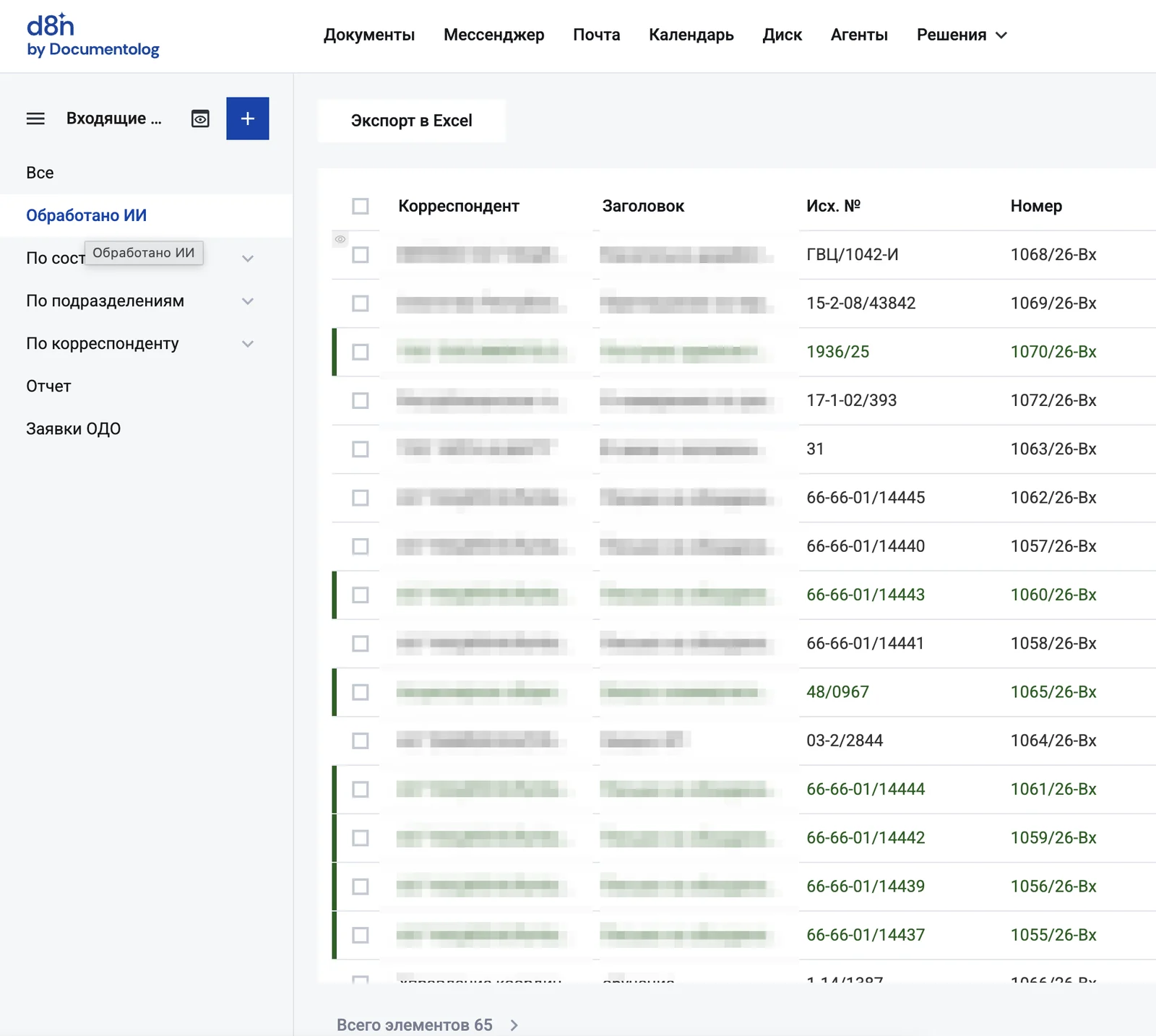
How it works for us. Today at Documentolog, absolutely every incoming and outgoing document is handled first by the AI agent: it classifies the document, makes a decision, and takes an action — registers it, determines the owner, puts it under control. A human doesn’t sit «at the entrance»: if the agent assigns it wrong, the assignee is the one who says so — clicks «not mine», the document is reassigned, and the agent takes that correction into account. That’s how we fully switched records over to the agent and took the routine work off the responsible employee. The records employee kept a new role — overseeing the agent’s work and handling exceptions. A dedicated «Processed by AI» view appeared in the register: the employee sees the flow of documents the agent has already handled and, instead of registering each letter by hand, does supervision — checking disputable cases and exceptions.
What the d8n Registry agent does beyond handling documents. Its second loop is reports on execution discipline inside the company: who delivers on time, where the overdue items are, which assignments are stuck. Such a report can be requested by a records employee — or by another agent that’s permitted to do so: for example, an executive’s AI assistant requests a summary from d8n Registry and brings it to the leader already in the context of their agenda. Agents start working with each other — under the same access rights as people.
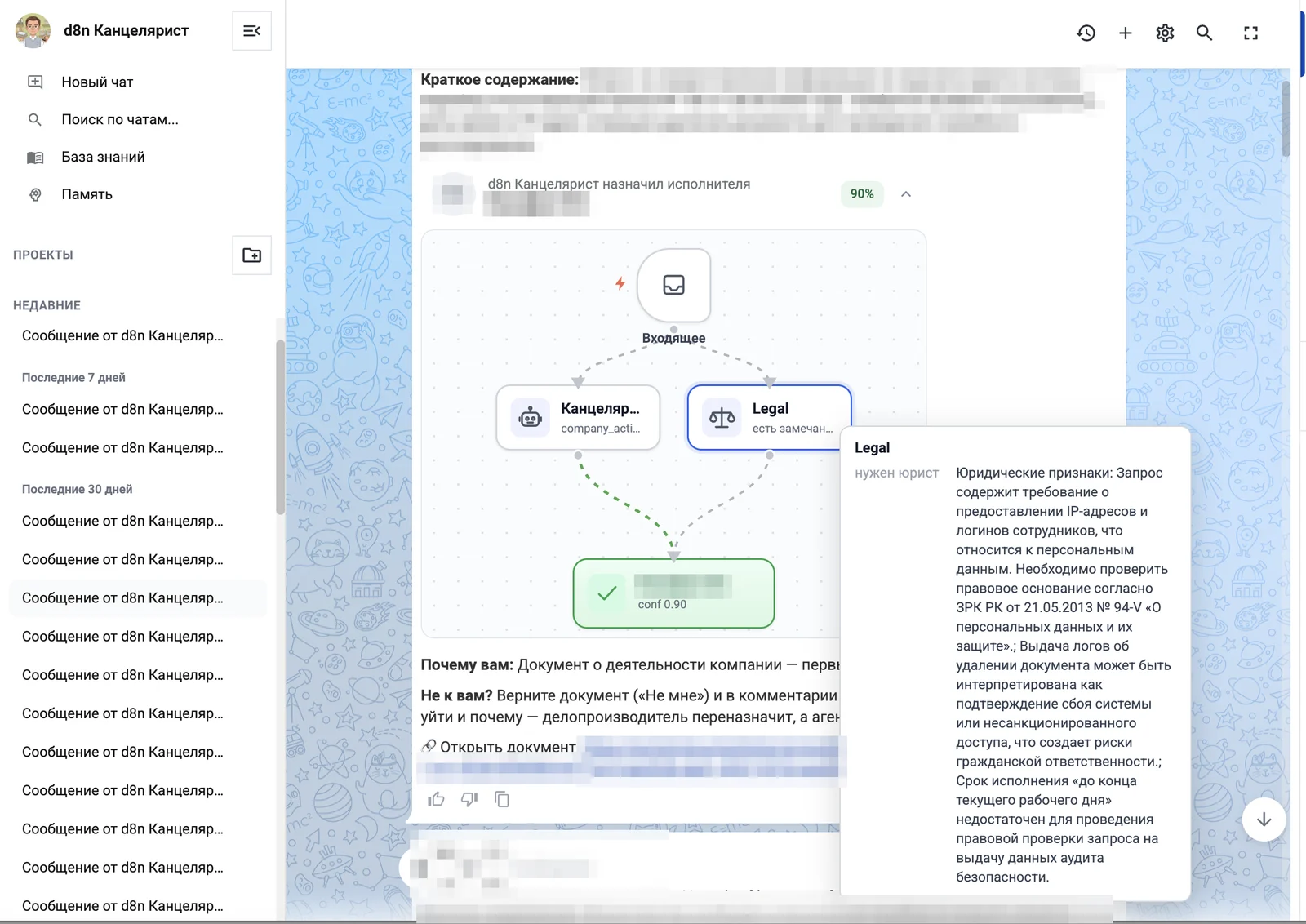
And one more thing we added on our side: in parallel with d8n Registry, every incoming and outgoing document is checked by the «Legal» AI agent — for legal signals and risks. For example, on an assignment from a government agency, «Legal» flags a discrepancy in deadlines between the text and the metadata and requires execution control. I’ll cover the «Legal» agent in detail in a future post.
To see the whole logic step by step — from an incoming letter to oversight in the journal — walk through the short breakdown below at your own pace:
- 1 Step 1 · Intake
An incoming document arrives
An incoming letter (PDF) enters the system — say, from a line ministry. The d8n Registry AI agent, not a human, is the first to act on it.
- 2 Step 2 · Registration
The agent read and registered it
The agent reads the file, extracts the fields — number, date, correspondent, subject — determines the document type and registers it in the Incoming journal as Вх-1043. All in seconds.
- 3 Step 3 · The logic
How the agent works out who to route it to
The agent doesn’t «guess» the assignee — it gathers context and maps it onto how the company is organized. First it answers three questions: who the document is from, what it is really about, and who in the organization is responsible for such matters. The answers come not from thin air but from system data — correspondence history, org structure, job descriptions and configured rules.
- 4 Step 4 · Criteria
Five signals the agent weighs
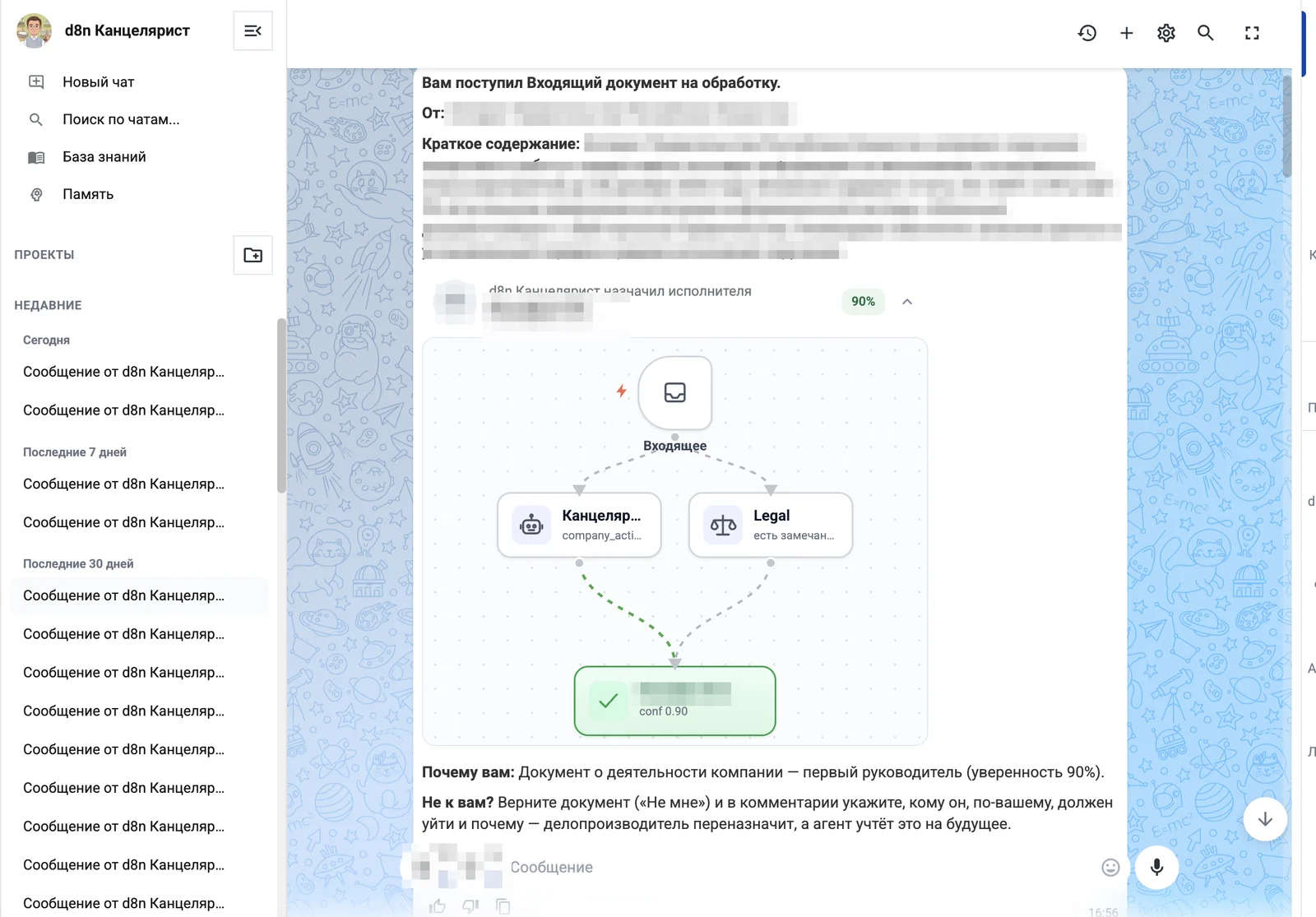
1) Correspondence history: who previously received letters from this correspondent (here — 7 of 8). 2) Subject ↔ the department’s area of responsibility from the org structure. 3) Job description: whose duties match the substance of the document. 4) Type and urgency (incoming letter, due date). 5) Manual exception rules set by the company. The agent combines the signals into a candidate with a confidence score.
- 5 Step 5 · The decision
95% confidence — and why it’s this person
Each signal carries weight, and the agent shows the resulting confidence — 95% here. If confidence is high, the document is assigned automatically; if signals conflict and confidence is low, the agent doesn’t decide alone but offers the human options with a rationale. Decision transparency is mandatory: you see not just «who» but «why».
- 6 Step 6 · Risk check
In parallel — a «Legal» check
While d8n Registry routes the document, the «Legal» agent checks it in parallel for legal signals and risks — for example, flagging a deadline discrepancy. The «Legal» agent is not part of the standard configuration and is enabled separately.
- 7 Step 7 · Oversight & learning
The «Processed by AI» view — and how it learns
The document goes to the assigned person for execution. A «Processed by AI» view appears in the journal: the employee no longer registers each letter by hand but oversees the agent and handles exceptions. If an assignment is wrong, the assignee clicks «not mine» — the document is reassigned and the agent remembers the correction, applying it next time. That is how the criteria get sharper over time.
- 8 Result
The human decides — the agent takes the routine
This is what an agent inside a real process looks like: it performs real operations — registers, picks the assignee, puts under control — under human oversight and with a full audit trail. That is the first measurable result from step 7.
Which metrics to set up — and how to count them. Before turning the agent on, fix a two-week baseline from the registration log; after turning it on, count the same numbers:
- Time from a document arriving to registration — the median. Baseline: how long it currently takes from a letter in the inbox to a card in the system. Goal: minutes instead of hours.
- Time to owner assignment — from registration to the document landing with the right person. Here the agent has an effect through routing over the reference data.
- Share of documents registered by the agent with no human edits. At the start a human confirms every card — count how many cards were accepted with no changes. This is a trust metric: it tells you when to widen autonomy.
- Share of reassignments — how many documents had to be redirected to another owner after routing. This is an honest metric of routing errors: it should fall month over month as the agent learns.
- Records hours spent on registration routine per week — the very number for a conversation about the effect in money.
How to roll it out. In the first weeks the agent works in assistant mode: it drafts the registration and the route, a human confirms. Every human edit is a learning signal: rules get refined, reference data gets filled in, and the share of «accepted with no edits» cards grows. Once metrics 3 and 4 become consistently clean — autonomy widens: the agent registers routine documents itself, the human controls the exceptions. That’s how the first measurable result appears without risk to the process.
As is the tradition of this series, I’ll commit publicly: as the first d8n Registry rollouts happen, I’ll share the real numbers here — what the metrics showed at the first clients. In the next issue I’ll break down step 3 — formalizing processes. If you’re already on this path, write in and tell me which process you started with and where you got stuck: I’ll cover the most common situations in the series.