Use case · Mail & documents

Turn correspondence into governed execution

Incoming letters, requests and documents become registered, owned, routed and deadline-tracked work — instead of items buried in someone’s inbox.

Nothing slipsDeadlines trackedFull audit
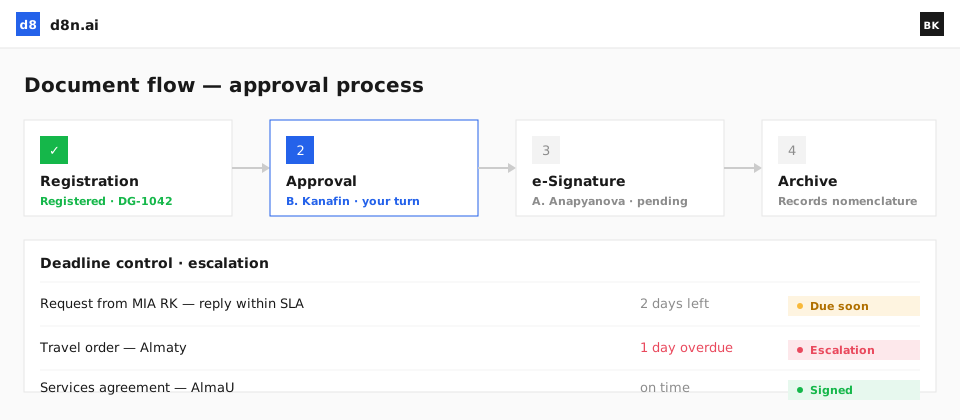
an incoming letter being registered, classified and routed with a deadline
Problem

Where inefficiency shows up

Requests buried in mail

Important asks sit unread in inboxes, with no owner and no deadline.

No accountability

When work lives in email, it’s unclear who is responsible or what stage it’s at.

Manual registration

Someone retypes every incoming document into a register by hand.

Capabilities

What d8n does

From the first email to the filed result, every step is registered, routed and controlled.

Register & classify

Incoming correspondence and documents are registered and classified automatically.

Assign owners & route

Each item gets an owner and follows the right approval route.

Track deadlines

Regulated and internal timelines are tracked, with escalation before they slip.

Draft outgoing

Replies and outgoing letters are drafted for your review.

Turn email into tasks

Any message becomes a task, assignment or document in one click.

Search the archive

Find any document by meaning across the full history.

Demo

See d8n in action

A short demo: the agent runs a real process inside d8n — from request to result.

Result

Before → after

Before

160 seconds per document — and hours to route it

An incoming letter or document is received, its type identified by hand, its details re-typed into a register and forwarded to the right person. Active handling is about 160 seconds per document — but the real loss is in queues and manual routing: a document can wait hours for the right owner.

After · with d8n and AI agents

≈10 seconds per document, routing is instant

The Records agent reads the scan (OCR), classifies the type itself, extracts the counterparty, number and date, registers the document in the EDM system and routes it to the right owner by rules and meaning. A person steps in only where a decision is needed.

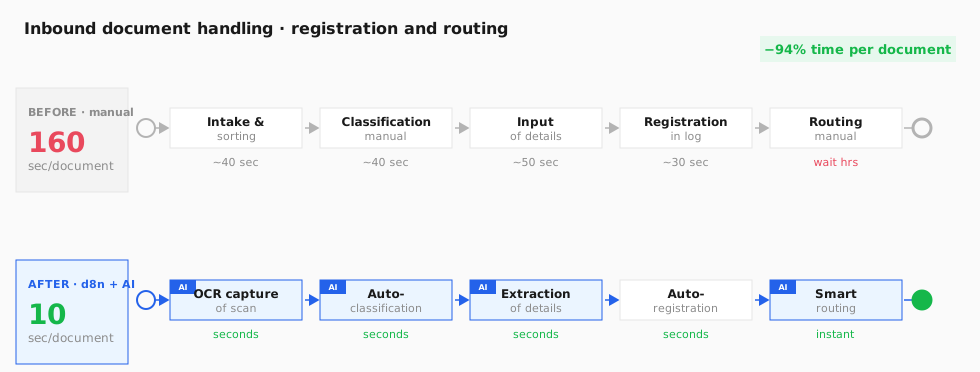
BPMN process diagram: stages and time before and after AI agents
Process stages and time per stage. Steps run by the d8n AI agent are marked in blue.
Time per document160 sec≈10 sec
Routinghoursinstant
Throughput×1up to ×5

Agent data sources: EDM/ECM, OCR engine, IDP classifier, counterparty directory, routing rules, registration log, archive.

Benchmark sources: arXiv ERPA — IDP (−93.8%) · ABBYY Mailroom Automation · VisualVault — Digital Mailroom

Agents working together

Several agents handle the document — in parallel and in sequence

From arrival to reporting, the document is passed between specialised agents. Some of the work runs in parallel, so the overall time shrinks and control increases.

1

A document arrives at the company

in parallel

A letter arrives at the d8n corporate mailbox or is uploaded as an incoming document. The Records agent reads it (OCR), classifies the type and registers it. In parallel, the Legal agent checks the document for legal risks — deadlines, obligations, non-standard terms — and flags them before it is even routed.

Records — registrationLegal — risks
Arrival → Records (OCR · classify · register) ∥ Legal (risk check) → routed to owner with flags
2

An employee acts on the document

The Records agent hands the registered document to the owner and brings in the d8n Assistant: it gathers context — related documents, correspondence history, templates — drafts a reply or decision and suggests deadlines. The employee reviews and acts.

Records — handoverAssistant — context & draft
Registration → Records hands over → Assistant (context + draft reply) → employee acts
3

The document is signed and sent

in parallel

Before signing, the outgoing document is checked by two agents in parallel: Registry (Records) for style, formal requirements, details and standard formatting; Legal for legal risks and wording. After edits — digital signature and dispatch to the counterparty.

Registry — style & formalitiesLegal — risks
Draft → Registry (style + formal requirements) ∥ Legal (risks) → edits → digital signature → sent
4

Reports on correspondence and execution discipline

The agent compiles reports itself — on incoming and outgoing mail, deadlines and execution discipline — and shows them in chat on request ("show this week's overdue items"). Or reports are generated automatically on a schedule and sent to managers and owners.

Records / Reporting
On request in chat → instant report · OR on a schedule → auto-sent to managers
Process

How it works

1

Arrives

A letter, request or document reaches d8n by email or upload.

2

Classified & registered

The agent recognises the type and registers it.

3

Routed with a deadline

It goes to the right owner and approval route.

4

Tracked & archived

Progress is tracked and the result is filed and searchable.

AI agent: The Records agent registers, classifies and routes documents and tracks deadlines; the Assistant drafts replies for approval.

Live walkthrough

How the agent handles a document — step by step

Live walkthrough 8 steps
  1. 1
    Step 1 · Intake

    An incoming document arrives

    An incoming letter (PDF) enters the system — say, from a line ministry. The «Records» AI agent, not a human, is the first to act on it.

  2. 2
    Step 2 · Registration

    The agent read and registered it

    The agent reads the file, extracts the fields — number, date, correspondent, subject — determines the document type and registers it in the Incoming journal as Вх-1043. All in seconds.

  3. 3
    Step 3 · The logic

    How the agent works out who to route it to

    The agent doesn’t «guess» the assignee — it gathers context and maps it onto how the company is organized. First it answers three questions: who the document is from, what it is really about, and who in the organization is responsible for such matters. The answers come not from thin air but from system data — correspondence history, org structure, job descriptions and configured rules.

  4. 4
    Step 4 · Criteria

    Five signals the agent weighs

    1) Correspondence history: who previously received letters from this correspondent (here — 7 of 8). 2) Subject ↔ the department’s area of responsibility from the org structure. 3) Job description: whose duties match the substance of the document. 4) Type and urgency (incoming letter, due date). 5) Manual exception rules set by the company. The agent combines the signals into a candidate with a confidence score.

  5. 5
    Step 5 · The decision

    95% confidence — and why it’s this person

    Each signal carries weight, and the agent shows the resulting confidence — 95% here. If confidence is high, the document is assigned automatically; if signals conflict and confidence is low, the agent doesn’t decide alone but offers the human options with a rationale. Decision transparency is mandatory: you see not just «who» but «why».

    95% confidence — and why it’s this person
  6. 6
    Step 6 · Risk check

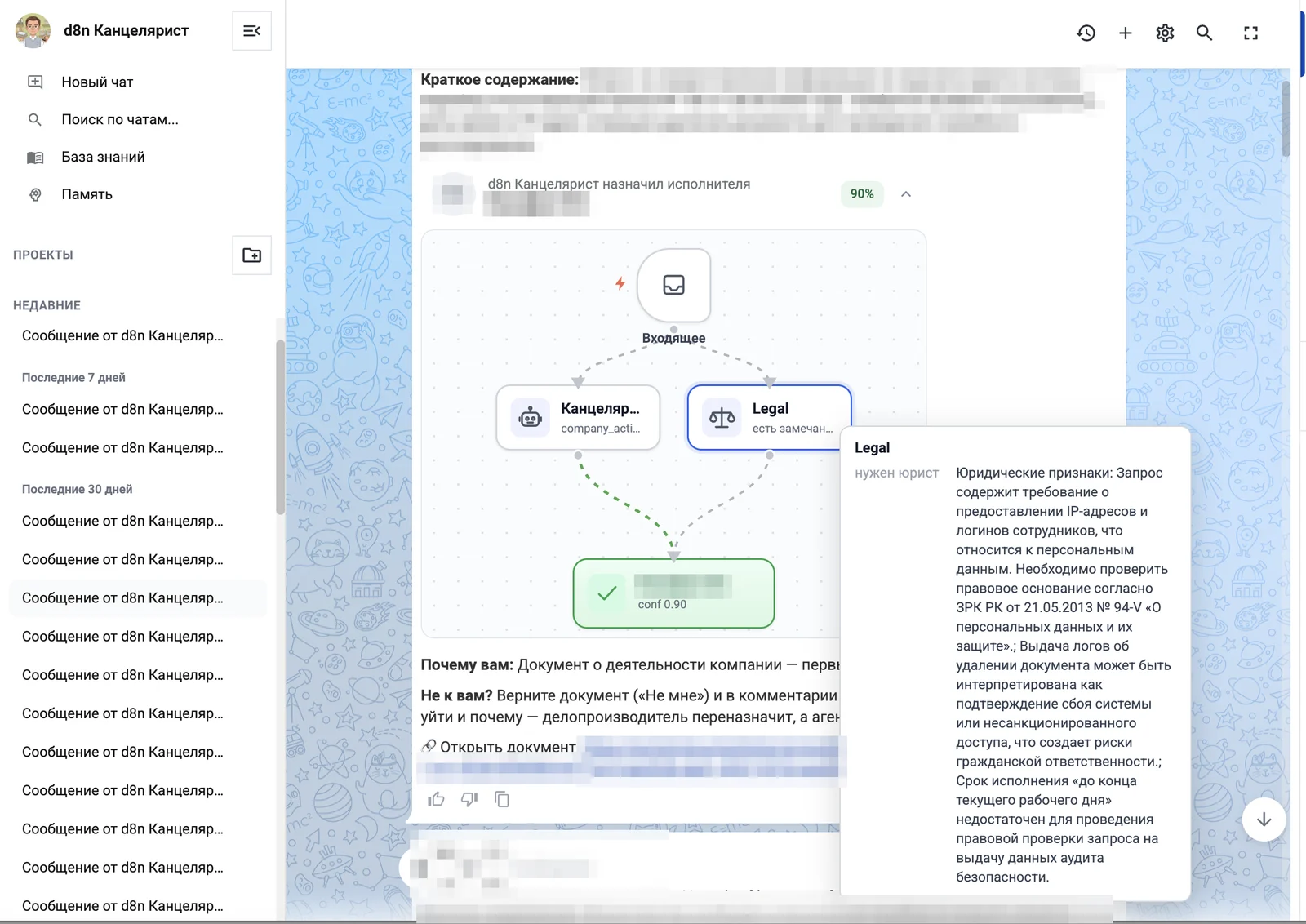
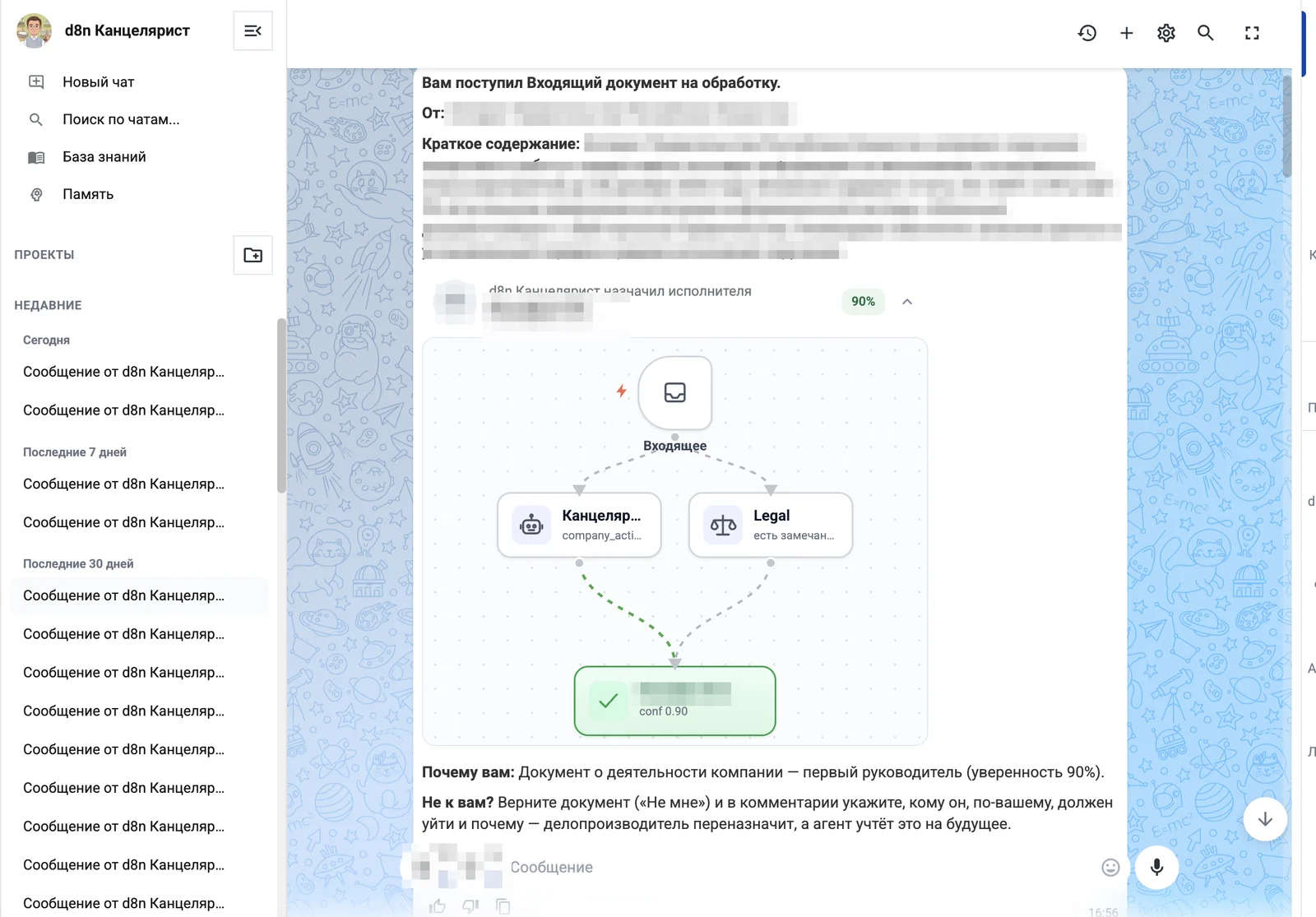
    In parallel — a «Legal» check

    While «Records» routes the document, the «Legal» agent checks it in parallel for legal signals and risks — for example, flagging a deadline discrepancy. The «Legal» agent is not part of the standard configuration and is enabled separately.

    In parallel — a «Legal» check
  7. 7
    Step 7 · Oversight & learning

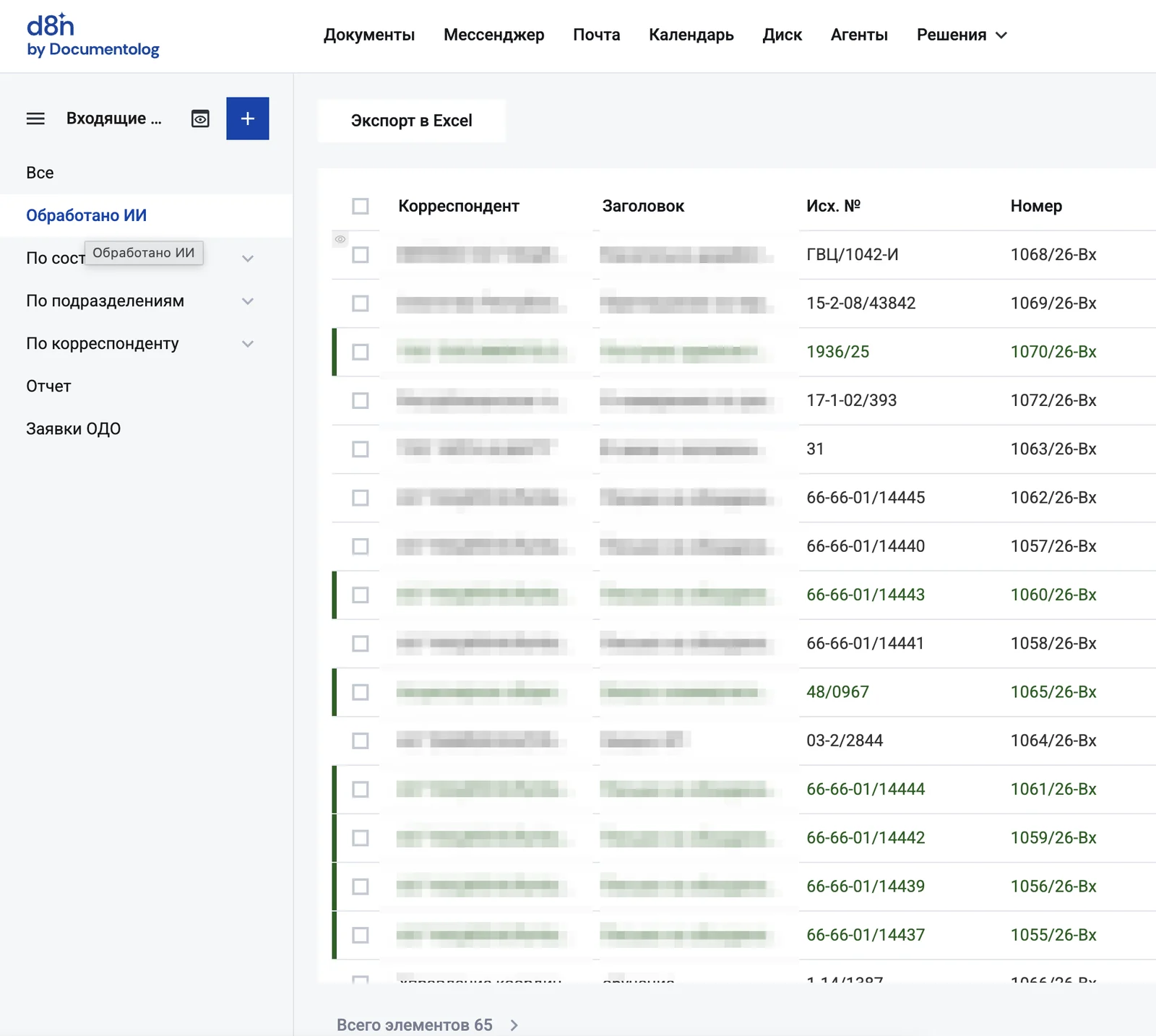
    The «Processed by AI» view — and how it learns

    The document goes to the assigned person for execution. A «Processed by AI» view appears in the journal: the employee no longer registers each letter by hand but oversees the agent and handles exceptions. If an assignment is wrong, the assignee clicks «not mine» — the document is reassigned and the agent remembers the correction, applying it next time. That is how the criteria get sharper over time.

    The «Processed by AI» view — and how it learns
  8. 8
    Result

    The human decides — the agent takes the routine

    This is what an agent inside a real process looks like: it performs real operations — registers, picks the assignee, puts under control — under human oversight and with a full audit trail. That is the first measurable result from step 7.

FAQ

Does this replace our email?

It can — d8n includes corporate mail — or it can bridge your existing email so correspondence flows into governed processes.

Can it read documents we already have?

Yes. Documents are classified and registered automatically, including scans via OCR.

How are deadlines handled?

Regulated and internal timelines are tracked with escalation before anything slips.

Is everything auditable?

Yes — every registration, routing and approval is logged with a full audit trail.

Trusted by
Ministry of Internal AffairsHalyk BankJusan BankKASEKazpostKazatompromTengizchevroilAstana HubAtamekenOtbasy BankSamruk-KazynaBeeline

Turn your inbox into governed work

See how correspondence becomes registered, owned and deadline-tracked work.